Posts
A post is a page: a piece of writing, a poster, a video, an event, a gallery, a piece of gear or something for sale. All seven kinds are made in the same editor. The left side is the post exactly as readers will see it, and the panel on the right is where you change it.
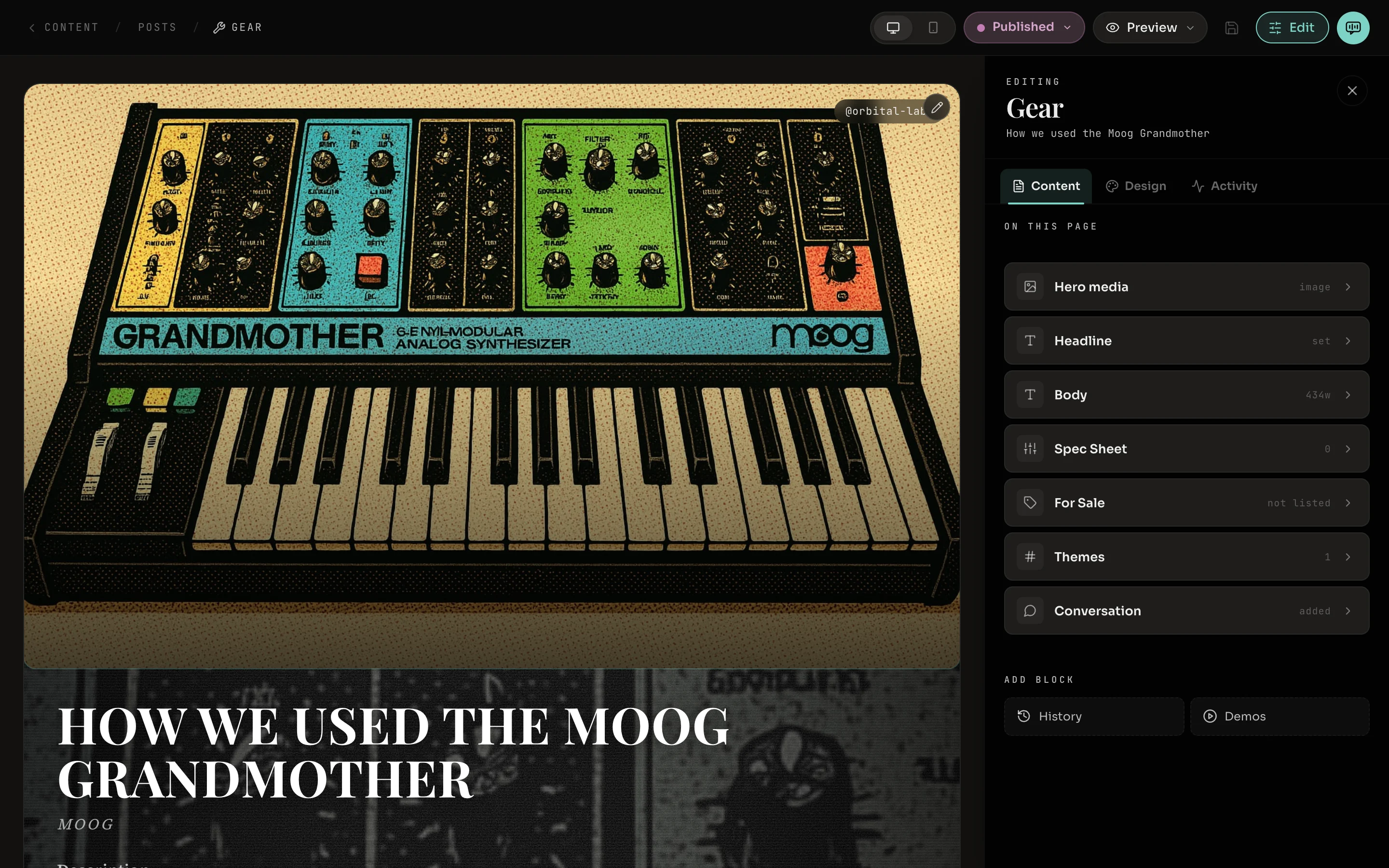
- 1Desktop and Mobile. Shows the post at the width of a computer or a phone.
- 2Status. Draft, Live or Published. Delete post is in the same menu.
- 3Preview. Full-screen preview, making a reel from the post, opening the public page, and copying its link.
- 4Save. Lights up when there are changes to save. This editor does not save on its own.
- 5Jam. Opens Jam beside the post, already knowing which post you mean.
- 6Content, Design, Activity. What the post says, how it looks, and what has happened to it.
- 7On this page. The blocks that make up the post, in the order they appear.
- 8The post. Click any part of it to open that block in the panel.
Blocks
A post is a stack of blocks. Every kind of post starts with the blocks that suit it, and each block opens to show its own fields. To find a block, click it in the list under On this page, or click that part of the post itself.
Add block at the bottom of the panel offers the blocks this kind of post can have and does not have yet. Opening a block shows Remove block at its foot. The body block has Write full-screen, which clears everything away except the words. Esc brings the editor back.
The seven kinds
Each kind has one block it is built around, which cannot be removed, and a set of optional blocks that fit it. Every kind also has a headline, and can have hero media, a body, themes and a conversation where readers reply.
| Writing | Body | Can add a soundtrack, a pull quote and a call to action. |
| Poster | One image | Can add a body and a call to action. Uses poster layouts, not templates. |
| Video | Video | Can add chapters and credits. |
| Event | When & Where | Can add a lineup, tickets and a soundtrack. |
| Gallery | Images | Can add process notes and a soundtrack. |
| Gear | Spec Sheet | Can add a for-sale panel, history and demos. |
| Merchandise | Product Shots | Can add materials, sizes and colors, and availability. |
Design
The Design tab decides how the post looks. A post follows your site’s look unless you choose otherwise, and the template your site uses is marked Your site.
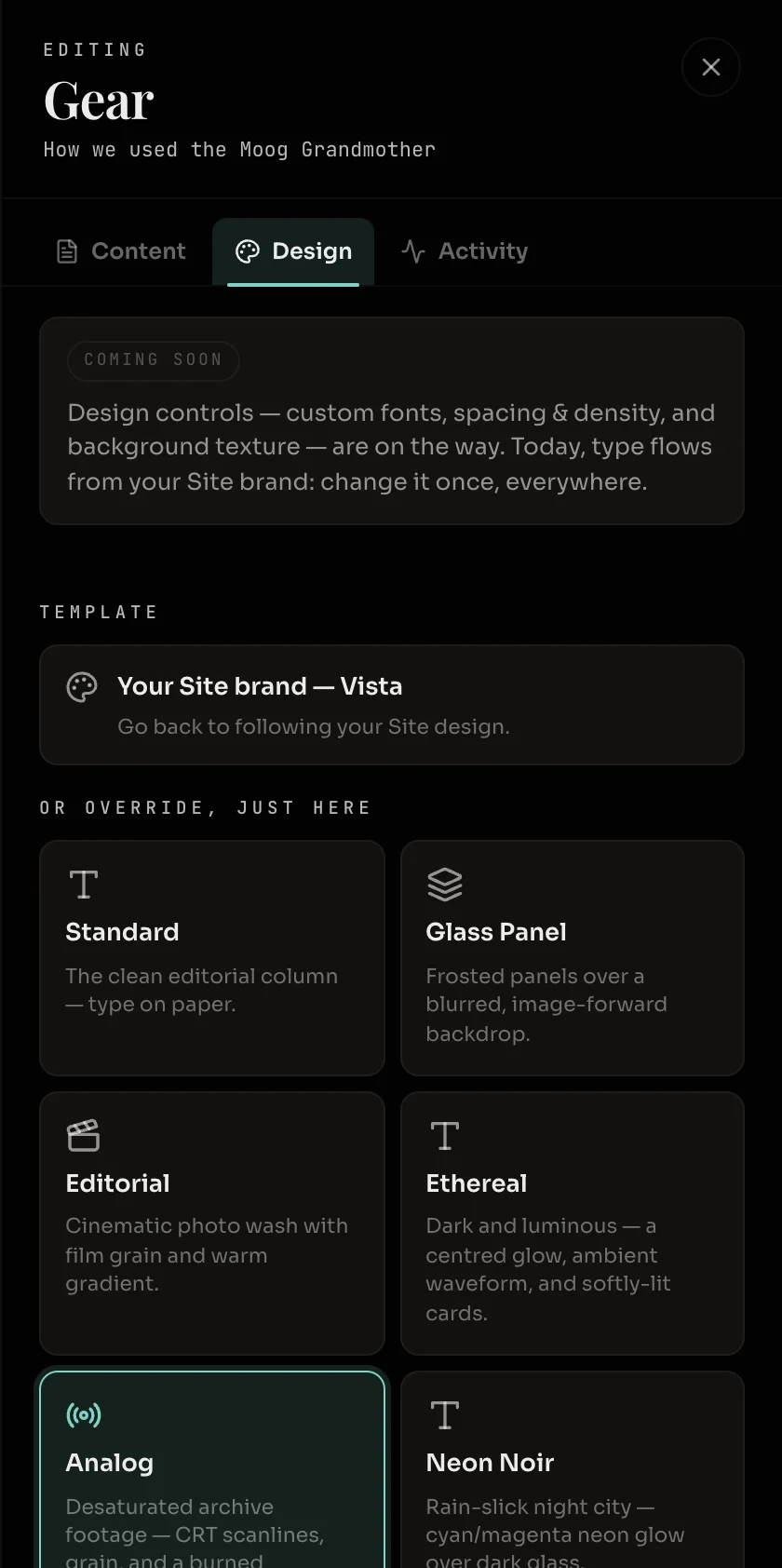
| Template | The overall look. Choosing one under Or override, just here changes this post only. |
| Template sliders | Each template has a few of its own, such as how dark the backdrop is. |
| Content section | Whether the reading area is light or dark. |
| Accent | One color from your brand palette, used for highlights. |
A poster has four layouts in place of templates: Classic Overlay, Caption Bottom, Quote Card and Silkscreen.
Activity
The Activity tab is a record you read, with nothing to change. It shows the post’s state in a sentence, its likes and comments, and the dates it was created, published, taken out of the feed and last edited.
Publishing and deleting
The status pill works as described in Draft, Live and Published. Delete post sits at the bottom of the same menu. Deleting a draft removes it for good. Deleting a post that is Live or Published also removes its page and takes it out of the feed.